
Run a short date-window poll, require full-trip availability (not just partial), and set a 48 to 72 hour deadline. Then lock the winning window fast with a calendar hold or small deposit. Do that and you'll have a commit-ready headcount and a locked date within days, not weeks. CrewsCanvas's DateSync tool is one way to run that exact process from a single link.
TL;DR:
- Using a full-window poll with a strict deadline and immediate deposit collection significantly reduces planning time and increases the likelihood of a committed headcount.
- The best approach varies by group size, with quick polls ideal for small groups, shared calendars suitable for scheduling within known systems, and spreadsheets or hybrid methods for complex constraints.
- Limiting response windows to 48–72 hours and explicitly defining "availability" as the full trip duration prevents scheduling delays and last-minute dropouts.
- Collecting dates before choosing a destination shortens decision cycles and minimizes the risk of planning paralysis caused by indecision or reluctance to finalize commitments.
- Tools like DateSync, TripHub, and SplitEase streamline the entire process by visually displaying overlaps, handling reservations, and managing deposits without requiring participants to download multiple apps or log in.
Table of Contents
- How Do You Collect Trip Availability Step by Step?
- Which Method Should You Use to Collect Availability?
- What Rules Reduce No-Shows and Flaky Responses?
- What's a Realistic 10-Day Timeline to Lock a Trip Date?
- Why Collecting Dates First Changes Everything
- Try DateSync Before Your Next Group Chat Spirals
- Sources
- FAQ
How Do You Collect Trip Availability Step by Step?
Most group trips stall because the organizer asks the wrong question first. "When's everyone free?" invites vague answers and endless scrolling through calendars that don't exist. The fix is a tighter sequence that filters commitment before it asks for calendars at all.
Here's the workflow that actually gets a date locked:
- Define the trip scope before you ask anyone anything. Decide the trip length (a long weekend, a full week) and the earliest and latest dates you're willing to travel. Without this, you'll get availability answers for the wrong window entirely.
- Send a binary commitment question first. Ask "in, out, or maybe" before you mention destinations or dates. Organizers who screen for commitment before scheduling reduce both planning time and last-minute no-shows, according to group trip planning research.
- Build one date-window poll and share a single link. Make sure it captures full-trip availability, not just "which days work," so a person who's free Monday through Wednesday but not Thursday doesn't get miscounted as available for a five-day trip.
- Set a 48 to 72 hour deadline and send one reminder at the 24-hour mark. Practical group travel coordination guidance points to this window as the sweet spot between giving people enough time and letting the whole thing drag for two weeks.
- Count full-window availability, not just raw votes. The winning date range is the one with the fewest total conflicts across the entire trip length, not the one with the most single-day check marks.
- Convert the top choice into commitments immediately. Send calendar holds and ask for a small deposit or RSVP the same day you announce the date. This is the step most groups skip, and it's the reason so many trips get "planned" three times and booked zero.
Pro Tip: Announce the date and open deposit collection in the same message. A 24-hour gap between "we picked a date" and "here's how to commit" is exactly when people start finding reasons to back out.
Which Method Should You Use to Collect Availability?
The right tool depends on your group's size and how much patience everyone has for another app. Three approaches dominate, and each has a real trade-off.
- Quick polls are the fastest and lowest-friction option, ideal for groups of 4 to 12 people who mostly plan from their phones. No one needs to log in, and results update in real time.
- Shared calendars work well when everyone already uses the same calendar system, but they're slower to set up and require more manual cross-checking, especially once you're past six people.
- Spreadsheets or matrices offer the most flexibility for complicated constraints (work travel, custody schedules, multiple trip legs) but need active maintenance. Someone has to chase updates, and a stale spreadsheet is worse than no spreadsheet.
- A hybrid approach often wins for larger or multi-timezone groups: run a poll to surface two or three candidate windows, then do a direct calendar check with the two or three people whose schedules are hardest to pin down.
Whatever you pick, run it against a short checklist: does it require a login (skip it if so, since login friction kills response rates), does it show a heat-map of overlapping availability, does it work cleanly on mobile, and can you convert the winning date into a calendar hold without re-entering everything by hand? A visible overlap map cuts down on the back-and-forth negotiating that normally eats up a week of group texts, since people can see the conflict for themselves instead of arguing about it, an effect confirmed in group trip date planning research. For a broader look at how different apps handle these trade-offs, CrewsCanvas's roundup of group planning apps breaks down feature categories in more depth.
What Rules Reduce No-Shows and Flaky Responses?
The biggest threat to a group trip isn't disagreement, it's silence. A poll that sits open for two weeks with half the group unanswered will kill a trip faster than an actual scheduling conflict. A few operating rules fix most of this before it starts.
- Cap the response window at 48 to 72 hours for the initial poll, and go even shorter (24 to 48 hours) for groups under six people who can reasonably respond fast.
- Limit candidate date windows to 3 to 6 options. Beyond that, you're triggering decision fatigue, and people either stall or pick randomly just to be done with it.
- Define "available" explicitly as the entire trip duration, not a single day inside it. State this in the poll itself: "Available means you can travel for the full 5 days, not just part of the window."
- Ask for a deposit or calendar hold immediately after the date is chosen. A short, staged sequence, commitment question, then date poll, then deposit, meaningfully increases the odds the trip happens instead of dissolving into "we should still do this sometime," according to research on group trip follow-through.
- State the consequence for non-response upfront. Something as simple as "no response by Thursday means we plan around the group that answered" keeps the process fair and stops one person from holding the whole trip hostage.
Pro Tip: If someone answers "maybe" to the binary commitment question, treat them as "out" for planning purposes. You can always add them back in if a spot opens up, but planning around a maybe guarantees your date poll results are unreliable.
What's a Realistic 10-Day Timeline to Lock a Trip Date?
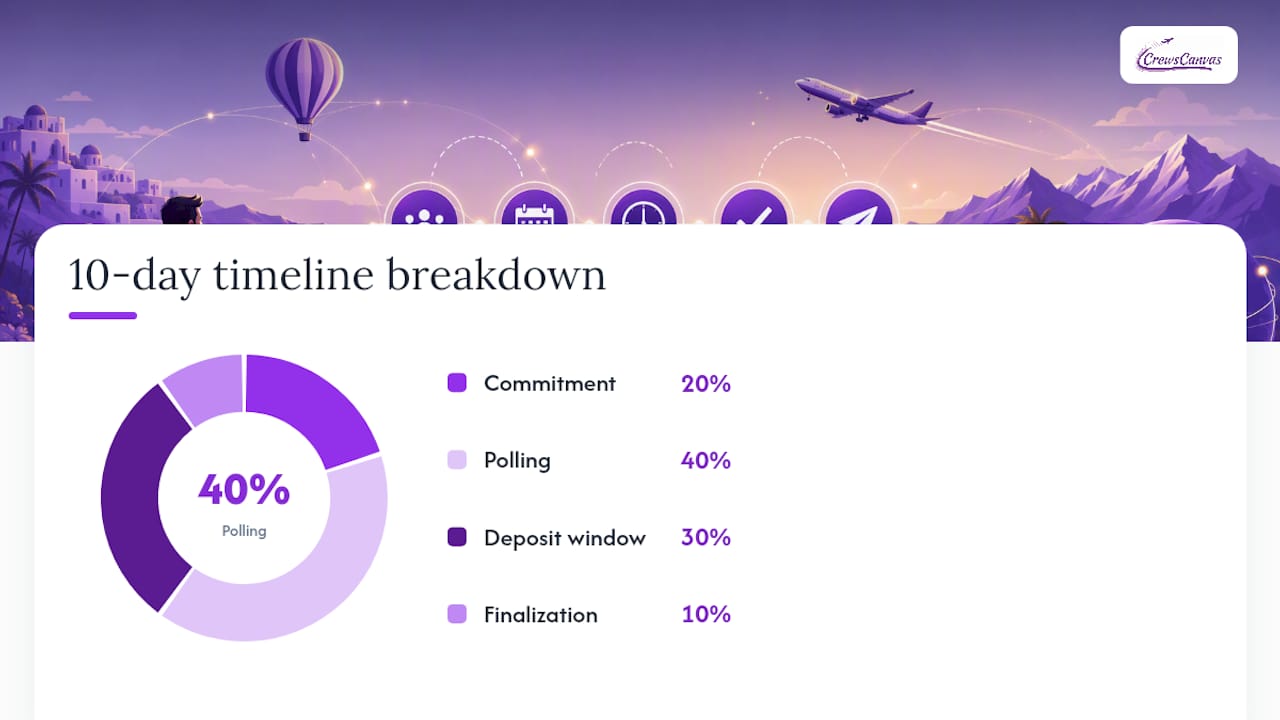
Here's a day-by-day breakdown that gets a trip from "someone mentioned it in the group chat" to a locked date with money on the table:
- Day 1: Organizer sends the binary commitment ask.
- Day 2: Commitment responses close; organizer builds the date-window poll.
- Day 3: Poll goes out with a 72-hour deadline.
- Day 5: Reminder sent to non-responders.
- Day 6: Poll closes; organizer reviews the heat-map and picks the window with fewest conflicts.
- Day 7: Date announced; calendar holds and deposit request sent same day.
- Day 9: Deposit deadline; reminder owner follows up with anyone unpaid.
- Day 10: Date and headcount locked; itinerary planning begins.
Assign three owners on Day 1: the organizer, a reminder owner, and a payment owner. Structured timelines with clear task ownership cut down on the burnout that usually falls on one exhausted person, per family vacation planning guidance.
Sample poll wording for the binary ask: "Quick gut check before I plan anything: are you in, out, or a maybe for a trip this fall? Just need a yes/no/maybe by Wednesday."
Sample date-window poll wording: "We're looking at these 4 windows for a 5-day trip. Please mark every window where you're free for the FULL 5 days, not just part of it. Poll closes Friday at 6 PM."
Sample deposit request: "We picked October 12 to 17! To lock your spot, send $50 by Sunday. This holds your place and goes toward the trip total."
For non-responders past the deadline, send one direct message (not another group blast) asking for a same-day answer, then move forward without them if you don't hear back. Last-minute changes get folded into the plan only if the new date still works for the paid, committed group, not the other way around.
Why Collecting Dates First Changes Everything
Most groups get this backward. They pick a destination, argue about it for two weeks, then try to find dates that work around a decision nobody can commit to yet. Flip the order. Collect dates first, and the destination conversation becomes much shorter because you're only solving for a smaller, already-committed group.
That's the logic behind DateSync, CrewsCanvas's polling feature: it captures full-window availability from every participant on one shared link, no account required, and shows the results as a visual overlap so the organizer isn't manually cross-referencing a dozen text replies. Once a date locks, TripHub keeps reservations and documents in one place, and SplitEase handles the deposit and expense math without someone having to be the group's unofficial accountant. CrewsCanvas has also written directly about this problem in how to pick a vacation date when your group has 10 different schedules, which walks through the same commitment-first logic in more detail.
The uncomfortable truth is that most "planning paralysis" isn't really about scheduling difficulty. It's about nobody wanting to be the person who sets a deadline and asks for money. That's an execution problem, not a calendar problem, and it's solved with structure, not more patience.
— CrewsCanvas
Try DateSync Before Your Next Group Chat Spirals
CrewsCanvas replaces the spreadsheet-and-group-chat combo with one shared link that handles the whole sequence: DateSync collects full-trip availability and shows it as a heat-map, so you can see the least-conflicted window instead of guessing from scattered replies.
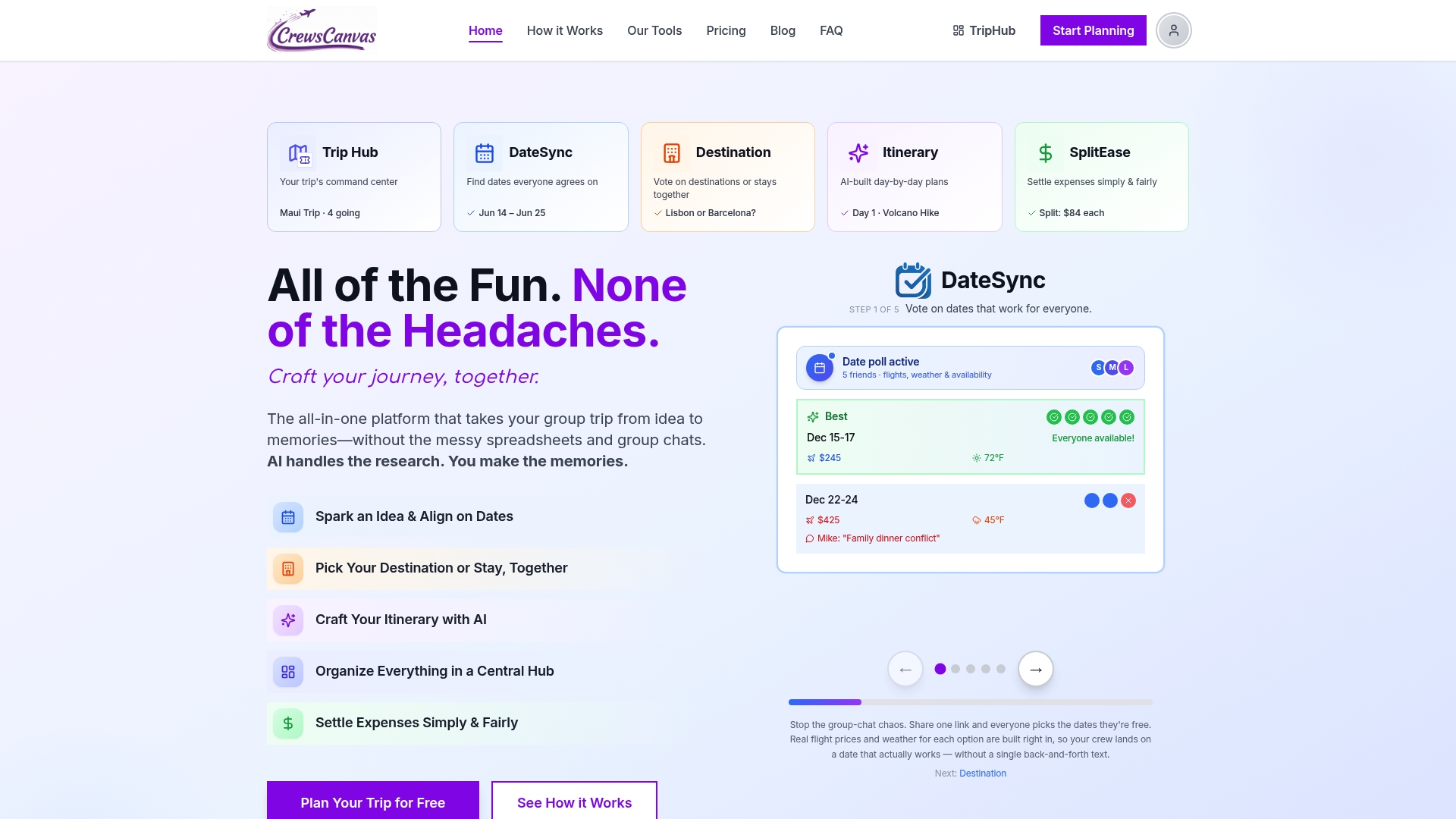
Once a date locks, TripHub keeps every reservation and shared document in one place, and SplitEase manages the deposit request and expense splitting so nobody has to send an awkward Venmo reminder. None of it requires participants to download an app or create an account, which matters when half your group ignores calendar invites anyway.
The Free plan covers small groups running their first poll, and the Pro Subscription at $9.99 per month unlocks added capacity for organizers running trips regularly. If you're planning one trip and want the full feature set without an ongoing subscription, One-Trip Pro is a one-off $14.99. Start a poll on DateSync today and see how fast a group actually answers when the ask is this simple.
Sources
For deeper reading on coordinating group schedules, see CrewsCanvas's guide on coordinating travel dates without the chaos. For planning timelines that cut organizer workload, Plan Family Vacations in 12 Weeks offers a useful framework. And if pricing volatility affects your date choice, why prices change by location explains the booking-timing angle.
- Group Travel Planning: How to Coordinate a Trip With Friends Without the Headache - WhenNOT Blog
- Plan Family Vacations in 12 Weeks and Cut Organizer Burnout
FAQ
How Long Should a Trip Availability Poll Stay Open?
A 48 to 72 hour window works for most groups, based on group travel coordination guidance. Smaller groups under six people can often close in 24 to 48 hours since there's less coordination overhead.
Do You Really Need a Deposit to Lock a Trip Date?
A deposit isn't strictly required, but it's the single most effective way to convert a tentative "yes" into an actual commitment. Even a small amount gives people a reason to treat the date as real rather than provisional.
What Do You Do About People Who Never Respond to the Poll?
Send one direct follow-up message instead of another group reminder, and set a hard cutoff after which you plan around whoever has responded. Stating that consequence in the original poll message makes it fair rather than a surprise.
What's the Best Way to Handle Full-Trip Versus Partial Availability?
Define "available" as the entire trip duration in your poll wording, not just any single day inside the window. This prevents someone free for two of five days from getting counted the same as someone free for all five.
Can CrewsCanvas Handle Time Zone Differences When Collecting Availability?
DateSync captures availability per date window regardless of where participants are located, since each person marks their own local availability against the shared trip dates. For groups spread across time zones, pairing the poll with a quick calendar check for key participants, as described in the tools and methods section above, adds extra precision.