A personalized travel itinerary is a day-by-day plan built around your dates, budget, pace and interests, not a generic "top 10 things to do" list. You can build one yourself in an evening: collect your constraints, draft each day with a realistic pace, check the routes, and keep the plan somewhere everyone can see and edit. The steps below work for a solo trip, a couple's getaway or a group of ten.
TL;DR
- Start with constraints (dates, budget, group size, pace, must-dos), then add activities. Reversing that order is how itineraries fall apart.
- Plan fewer things per day than feels natural, and leave open blocks for rest and surprises.
- AI tools and Google Maps are useful drafting helpers, but each has a job: AI proposes, maps check the routes.
- If you travel with others, ask about pace and downtime instead of assuming, and keep one shared, editable plan.
- Treat the itinerary as a living document: version it, share a link, and update it as bookings change.
Table of Contents
- What makes an itinerary personalized
- How to create your own personalized travel itinerary, step by step
- Using AI to draft a custom travel itinerary
- Using Google Maps to check and shape your route
- Customizing an itinerary for people with different needs
- A sample personalized day, before and after
- Keeping your itinerary useful as plans change
- Do it yourself or hire a planner?
- Our perspective
- Build your personalized itinerary with your group
- Common mistakes to avoid
- FAQ
- Sources
What makes an itinerary personalized
An itinerary is personal when you could not hand it to a stranger and have it work. It reflects how early you like to wake up, whether you would rather spend three hours in one museum or see four neighborhoods, what you will pay for and what you will skip, and who is traveling with you.
That is also why generic itineraries disappoint. They are written for an average traveler who does not exist. A plan for a food-focused couple on a long weekend looks nothing like a plan for three generations of one family on a week at the coast, even if both are going to the same city.
Personalization has four layers:
- Fixed points: flights, check-in times, reservations, event tickets.
- Preferences: the kind of trip you want (slow, adventurous, cultural, relaxed) and the things you care about most.
- Limits: budget, mobility, kids' nap times, dietary needs, how much driving anyone will tolerate.
- Flexibility: the buffer you build in so one delayed train does not wreck the day.
Get those four down on paper before you open a single "best things to do" article.
How to create your own personalized travel itinerary, step by step
1. Write down your constraints first
Open a blank document and list your dates, arrival and departure times, total budget, number of travelers, and the two or three things the trip must include. This is your frame. Everything else has to fit inside it.
If you travel with a group, this is the stage where you settle the dates together. Polling people beats a 60-message chat thread, and our DateSync date polling is built for exactly that step.
2. Decide your pace
Pace is the most overlooked setting in any itinerary. Ask yourself: do you want one main activity per day, or a full schedule? Our guide on how many activities per day on a group trip goes deeper, but a useful starting rule is one anchor activity in the morning or afternoon, one lighter option, and a meal you have actually thought about.
3. Build the skeleton, then fill it in
A simple structure that works for nearly any trip is the one wikiHow's travel itinerary guide describes: a general information section (transportation, accommodation, contact details, emergency numbers), a dates and times section (arrivals, departures, connections, reservations) and a notes section for tips and loose arrangements.
Then add a day-by-day layer on top:
- Morning, afternoon and evening blocks for each day
- Address, opening hours and booking status for every stop
- Travel time between stops, including how you will get there
- A "if it rains" alternative for outdoor plans
4. Cluster by geography
Group stops by neighborhood or area so you are not crossing the city three times in a day. Put the stops with fixed times (timed tickets, reservations) in first, then fit flexible ones around them.
5. Check the logistics
This is where itineraries quietly break. Walk through each day and ask: how do we get from A to B, how long does it take, and when do we eat? For larger groups, ground transport needs earlier attention than most people expect. This group transfer booking timeline is a good model for working backward from your arrival day.
6. Add the documents
Confirmations, tickets, passport details and insurance numbers belong next to the plan, not in six different inboxes. Our walkthrough on organizing trip documents for a group trip shows one way to do it.
Using AI to draft a custom travel itinerary
Yes, AI can produce a usable first draft of an itinerary in seconds. The quality of the draft depends almost entirely on what you tell it.

Claude Academy's itinerary prompt guide recommends including the destination, trip length, specific interests, travel pace, group size and budget, and asking for realistic timing based on actual distances. That list is a good checklist whichever tool you use.
A prompt that works looks something like this:
We are four adults visiting Lisbon for five days in spring. We like food markets, walkable neighborhoods and one day trip. Moderate pace, no more than two planned activities per day, mid-range budget. Group lunch is the main meal. Please give realistic walking and transit times between stops.
What to do with the draft
Treat AI output as a first pass, not a finished plan:
- Verify every opening time and booking requirement on the venue's own page.
- Check the routes. Paste the stops into a map and see whether the day is physically possible.
- Cut a third. Drafts tend to be ambitious. Remove stops until each day has breathing room.
- Swap in your own picks. The point of personalization is that your must-dos, not the tool's, anchor the day.
Our AI itinerary builder follows this same logic: it generates a day-by-day plan that you can then customize stop by stop, so the draft becomes yours.
Using Google Maps to check and shape your route
Google Maps is a strong route checker, but it is not an automatic multi-day scheduler. According to Google's help page, on desktop you can open Directions, enter a start and destination, pick a travel mode, compare estimated times, reorder stops and add up to nine stops, final destination included.
For trips planned ahead of time, Google also says you can choose Depart at or Arrive by for future driving or transit trips, though that option supports a single destination and needs sign-in.
That leads to a sensible division of labor:
- Use saved place lists to collect restaurants, sights and hotels without committing to an order. As one guide to multi-stop itineraries in Google Maps puts it, lists collect places without imposing a route or timetable.
- Use multi-stop directions to test a single day's route.
- Use a separate itinerary document for the actual schedule, bookings and notes.
Customizing an itinerary for people with different needs
The hardest personalization problem is not planning for yourself. It is planning for a group where one person wants to hike at dawn and another wants a slow breakfast.
AARP's multigenerational-travel guidance, published in November 2025, suggests asking travelers about desired downtime, pace and interests rather than assuming, and mixing high-energy options with calmer ones. The same piece makes the point that flexibility and varied energy levels matter more than picking the flashiest destination, and that shared trips work best with both common activities and room for independence.
Put that into practice with a few habits:
- Ask before you plan. A short poll ("ideal morning: early start, mid-morning, late?") surfaces conflicts early.
- Plan two or three group anchors, not ten. Shared dinners, one big excursion, one beach or park day.
- Build optional blocks. Mark some afternoons "free choice" and list two or three options so people can split up and regroup.
- Match the energy. Follow a full-on day with a calm one.
- Handle money in the open. Decide up front how shared costs are split. A tool like SplitEase expense splitting tracks shared costs as you go, so there is no awkward reckoning at the end.
For families in particular, this family travel planning guide covers planning for travelers with different needs. And if you want a deeper walkthrough of building a plan a whole group sticks to, our post on how to create a group trip itinerary everyone will actually follow is the next stop.
A sample personalized day, before and after
Here is what personalization changes in practice. Imagine a generic plan for a day in a big city:
- 8:00 Museum A
- 10:30 Landmark B
- 12:30 Lunch somewhere nearby
- 14:00 Museum C
- 16:00 Neighborhood D
- 19:00 Dinner
Now imagine the same day for a group of friends who like food and hate rushing:
- 9:30 Slow breakfast near the hotel (no reservation, just go)
- 11:00 Food market, wander and graze for lunch
- 13:30 Free time (options: museum nearby, park, rest at the hotel)
- 16:00 Walk through one neighborhood, no destination required
- 19:30 Group dinner, booked a week ahead, table for the whole crew
The second plan has fewer stops, a clear anchor (the dinner reservation), a buffer, and options. It is personalized because it reflects how these people actually travel.
Keeping your itinerary useful as plans change
Plans change. A flight shifts, a museum closes for renovation, someone gets sick. An itinerary that cannot absorb that gets abandoned by day two.
- Keep one source of truth. Multiple copies in chats, notes apps and screenshots drift apart. Choose one place and point everyone to it.
- Share a link, not a file. A link always opens the latest version. Attachments go stale the moment you edit.
- Mark confirmed vs. tentative. A simple label next to each item stops people from showing up to a restaurant that was only a maybe.
- Note the date of the last edit at the top so people know they are looking at current information.
- Make editing easy. If only the organizer can change the plan, they become a bottleneck. Let the group suggest changes.
- Keep a printout or offline copy of key details (addresses, confirmation numbers) for spotty signal.
If you want a ready-made layout to copy, our printable group travel itinerary template gives you a structure to paste your plans into, and our guide to a shared travel itinerary explains how to keep it up to date once the group is using it.
Do it yourself or hire a planner?
You can hire a travel designer, and for very complex, multi-country or luxury trips some people do. Fees vary widely with the complexity of the trip and how much of the work is research versus booking, so ask any planner exactly what the fee covers before you commit.
For most trips, a weekend away, a family reunion, a friends' vacation, a team retreat, building your own plan with the right tools is realistic and gives you full control. The real challenge is not finding ideas. It is getting everyone to agree and keeping the plan in one place, which is where a shared planning hub earns its keep.
Our perspective
We built CrewsCanvas around a simple observation: the itinerary is rarely the hard part of a group trip. The hard part is getting a dozen people to agree on dates, destinations and budget, then keeping the plan alive once the trip is booked.
That is why we think a personalized itinerary should begin with the group, not with a list of attractions. DateSync lets everyone vote on dates. Our AI itinerary generator drafts a day-by-day plan you can customize, so you start with something concrete instead of a blank page. TripHub keeps documents and reservations next to the plan, and SplitEase handles shared costs, including receipt scanning, so money never becomes the awkward part.
We also believe the people you travel with should not have to jump through hoops. Participants can use the shared link on the web without installing an app or creating an account. The organizer plans, the group contributes, and the plan stays in one place.
CrewsCanvas
Build your personalized itinerary with your group
If you are planning with other people, start with a plan everyone can open. CrewsCanvas gives you date polling, an AI-generated itinerary you can edit, shared documents and expense splitting in one place. The Free plan covers small groups. Pro Subscription is $9.99 per month, and One-Trip Pro is $14.99 one-off if you just need more capacity for a single trip. See the plans and pricing, or explore the full group trip planning toolkit.
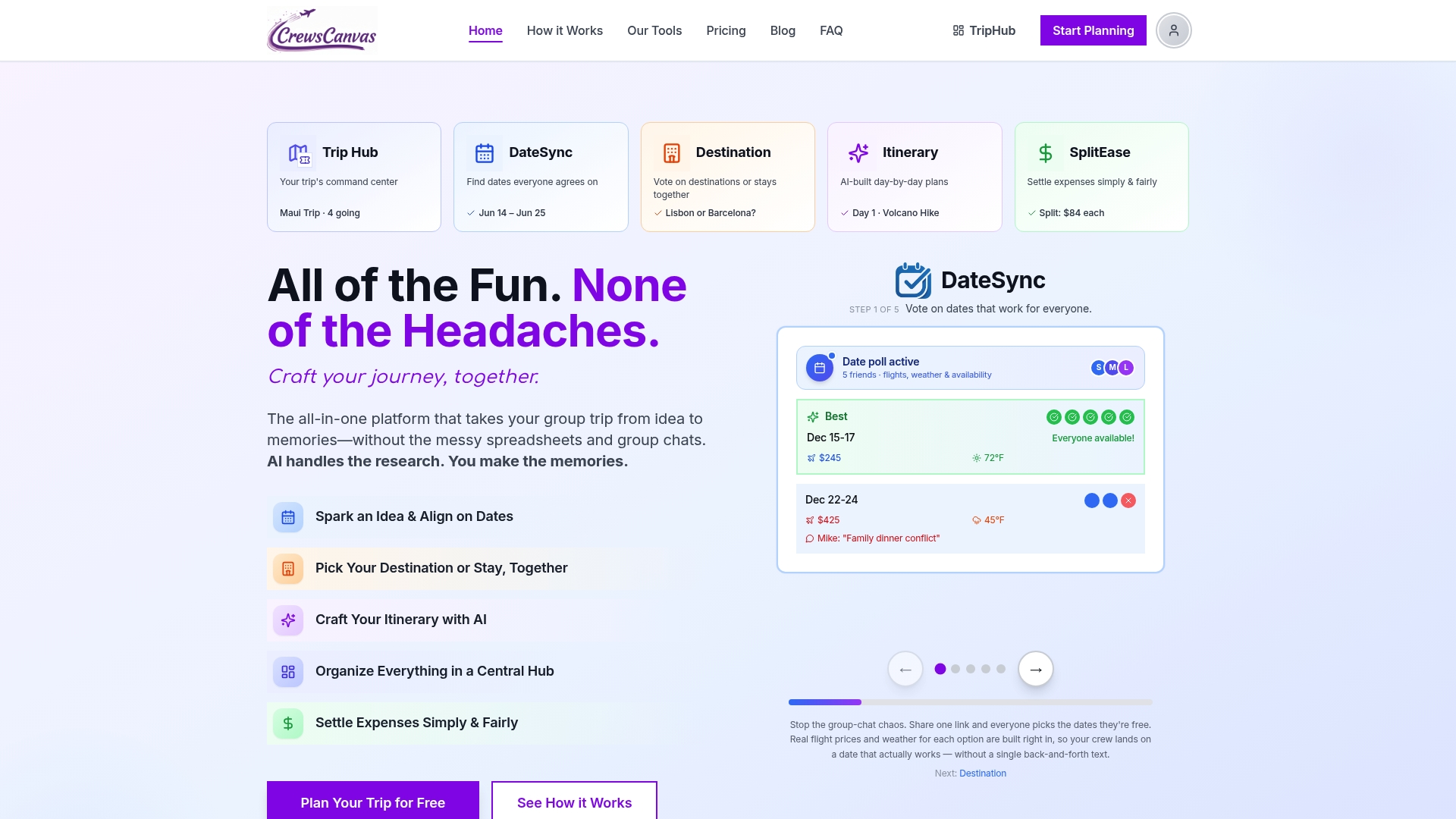
If you would like to see how the pieces fit before choosing a plan, the CrewsCanvas home page walks through the whole flow from first poll to final settlement.
Common mistakes to avoid
- Overpacking days. The most common itinerary failure. If you are unsure, cut one stop per day.
- Ignoring travel time. A 20-minute ride on the map becomes 45 minutes with a taxi line and a missed turn.
- Planning for the "ideal" you. Plan for the tired, hungry, jet-lagged version of you who will actually be there.
- Skipping the meals. Group meals without a plan lead to 40 minutes of standing on a sidewalk debating.
- Keeping the plan with one person. If the organizer is unreachable, everyone is lost.
- Not telling people what is booked. Mark clearly what needs to be paid for, by when, and by whom.
FAQ
How do I create my own travel itinerary?
Start with your fixed constraints: dates, budget, group size and must-do items. Then set a pace, cluster activities by area, check travel times between stops, and add bookings and documents. Keep the plan in one shared, editable place so it can change as you go.
Can AI create an itinerary for my trip?
Yes. AI can draft a day-by-day plan quickly, and results improve when you give it the destination, length, interests, pace, group size and budget. Treat the draft as a starting point: confirm opening hours and routes, then edit it so it reflects your own priorities.
Can Google Maps create a trip itinerary?
Google Maps can build multi-stop routes, with up to nine stops on a desktop route, but it does not generate a multi-day schedule for you. Use it to collect places and test each day's route, and keep your actual schedule and bookings in a separate itinerary.
How do I customize an itinerary for a group?
Ask everyone about pace, downtime and interests before you plan. Build two or three shared anchor activities, then leave optional blocks so people can split up and regroup. Alternate busy days with calm ones.
How do I keep an itinerary up to date when plans change?
Share one live link instead of copies, label items as confirmed or tentative, and let group members suggest edits. Keep an offline copy of key addresses and confirmation numbers in case the signal drops.
Sources
- How to Create a Travel Itinerary: 6 Easy Steps for Any Trip (wikiHow)
- Create a daily travel itinerary (Claude Academy)
- Get directions and show routes in Google Maps on a computer (Google Maps Help)
- Discover helpful features in Google Maps on a computer (Google Maps Help)
- How to Create a Multi-Stop Itinerary in Google Maps
- Tips to Create a Harmonious Multigenerational Trip (AARP)
- Family Travel Planning Guide
- Group Transfer Booking Timeline for Organizers