The simplest way to share travel plans with friends is to put everything in one place that everyone can open from a link: the dates, the day-by-day itinerary, the bookings and the costs. Skip the 200-message group chat and the spreadsheet only one person understands. Pick a single home for the plan, decide who can edit it, and tell the group how changes will be announced.
This guide walks through what a shared plan needs, how to choose between a document and a trip-planning platform, how to settle dates, how to keep everyone current when plans change, and how to split money fairly. It works for friends, family reunions, couples and team retreats alike.
TL;DR
- Keep one shared plan with a link everyone can open. Do not scatter it across chats, emails and screenshots.
- Include dates, day-by-day activities, accommodation, transport, confirmation details, costs and a contact person for each booking.
- Settle dates with a vote before booking anything, then lock the decision in the plan.
- Decide in advance who can edit and who can only view, and say where change announcements will live.
- Track shared costs as you go so nobody has to chase anyone for money after the trip.
Table of Contents
- Why plans get lost in group chats
- What a shared travel plan should include
- Step 1: Agree on dates before anything else
- Step 2: Choose a home for the plan
- Step 3: Build the itinerary together
- Step 4: Share it the right way
- Step 5: Keep everyone up to date when plans change
- Step 6: Share the costs without awkwardness
- Sharing accommodation details
- Sharing plans for a road trip
- Our perspective
- Try it with your next group trip
- FAQ
- Sources
Why plans get lost in group chats
Picture it: someone posts the flight times on Tuesday, someone else shares a restaurant link on Thursday, and by the weekend nobody can find the address of the rental house. Group chats are great for banter and terrible for reference. Every useful detail gets buried under reactions, photos and side conversations.
Spreadsheets solve part of that. They hold rows of information in one file. But they are clunky on a phone, they depend on one person keeping them tidy, and not everyone in the group wants to learn how to use one. The result is a familiar failure: everyone assumes someone else has the document, and the one person who built it is the only one who ever opens it.
A shared travel plan fixes this when it has three qualities:
- One source of truth. If two versions exist, people will follow the wrong one.
- Easy access. If it takes an account, an app download or a password reset, some people will never open it.
- Clear ownership. Someone is responsible for each booking, each decision and each update.
What a shared travel plan should include
A good shared plan lets a traveler act without asking a follow-up question. Group travel guides consistently point to the same building blocks, and a professional guide to sharing itineraries lists day-by-day dates, locations, accommodation and transport details, pricing where relevant and contact information as the core. Here is how that turns into a practical checklist.
The basics everyone needs
- Dates and times. Arrival and departure dates, flight or train times, and the schedule for each day.
- Where you are staying. Address, check-in and check-out times, parking, how to pick up keys, WiFi details and who to call if something goes wrong.
- How you are getting around. Flights, rental cars, shuttles, rail passes, who is driving.
- Confirmed reservations. For each one: date, time, location and confirmation number.
The details that prevent arguments
- Who booked what. For trips with two or more travelers, a useful master plan notes who is responsible for each reservation, how it was paid for and who needs access to the confirmation. That one habit prevents the classic situation where everyone thinks someone else has the paperwork.
- Optional versus required. Mark which activities the whole group is doing and which are optional. People relax when they know they can skip the hike or the pricey dinner without feeling like they are letting anyone down.
- A point of contact. One name next to each activity or reservation, so questions go to the right person.
- Costs. What each activity or booking costs and who has paid so far.
A simple day layout
For each day, a short block works better than a long paragraph:
| Time | Plan | Where | Booked by | Required? |
|---|---|---|---|---|
| 9:00 a.m. | Breakfast | Hotel café | No booking | Optional |
| 11:00 a.m. | Guided walking tour | Meet at the main square | Dana | Everyone |
| 3:00 p.m. | Free time | Your choice | n/a | Optional |
| 7:30 p.m. | Group dinner | Reservation under Sam | Sam | Everyone |
If you want a ready-made structure to copy, our printable group travel itinerary template has copy-and-paste blocks you can adapt.
Step 1: Agree on dates before anything else
Dates are the first thing that breaks a group trip. Everyone has a different work schedule, school calendar or family obligation, and the usual method, one person asking in the chat and scrolling back through replies, rarely works.
A better approach:
- Offer a short list of date windows, not an open-ended "when are you free?"
- Ask everyone to vote on each option, including "works if needed."
- Set a deadline for voting, such as one week.
- Announce the winner in the plan itself, then stop discussing alternatives.
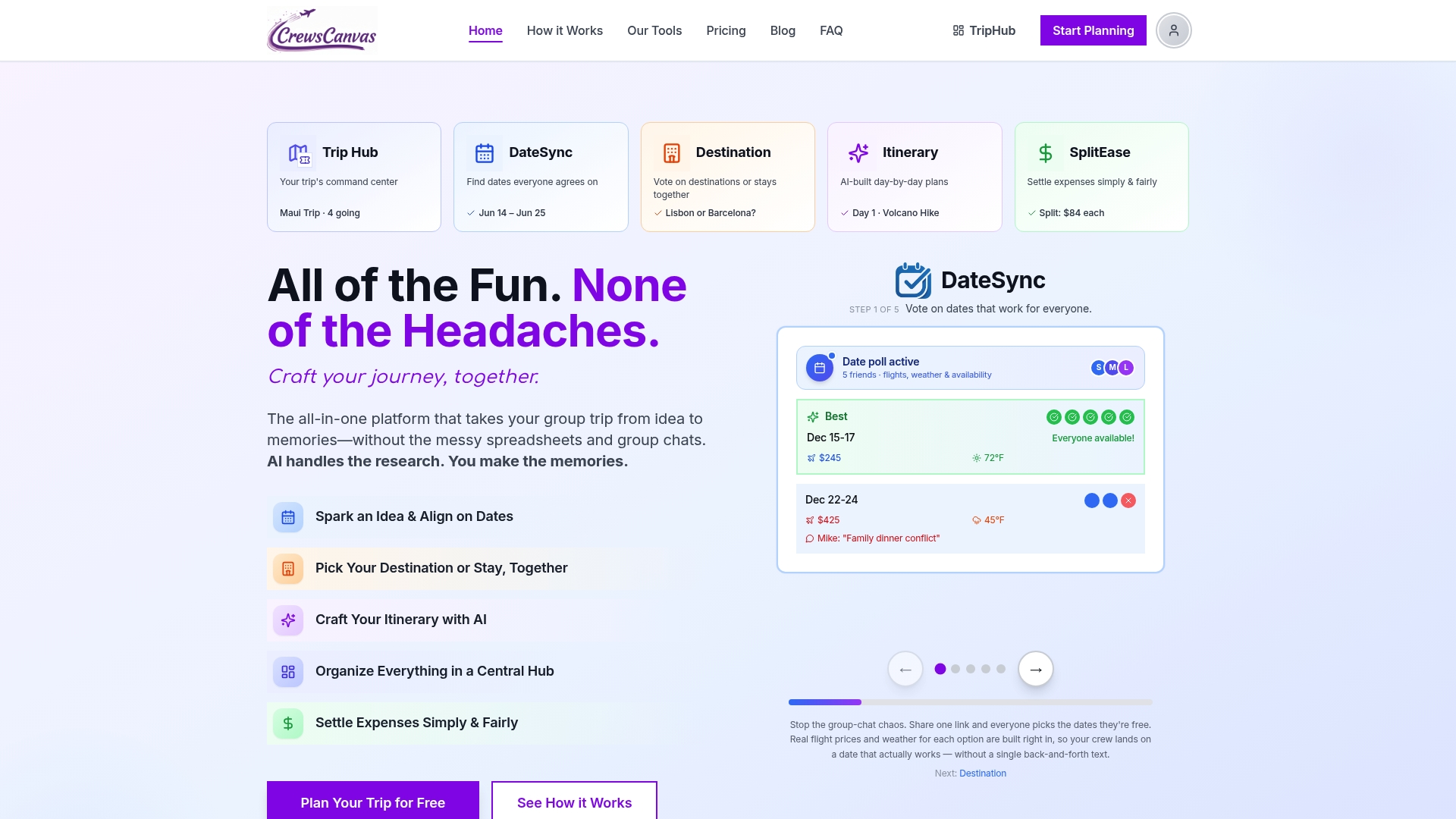
This is what DateSync does in CrewsCanvas: the organizer proposes dates, participants vote through a shared link, and the best overlap is easy to see. You can read more about DateSync date polling if your group is stuck at this step.
Do not book non-refundable flights or deposits until the dates are confirmed by everyone who is actually going. Our guide to checking beds and fees before paying a deposit covers what to confirm before money changes hands.
Step 2: Choose a home for the plan
There are three common options, and the right one depends on the size of your group and how complicated the trip is.
Shared document or spreadsheet
This is the fastest to start. A shared document lets you control access with view, comment or edit permissions, and you can share it with a link. It suits a small group, a weekend trip and a plan that is mostly a list.
The weak points show up on mobile, with larger groups and with trips where costs, votes and bookings all need to live together. You end up with a plan in one file, a vote in the chat and expenses in a third place.
A group chat with pinned messages
Pinning works for a handful of crucial facts: the address, the flight times, the host's phone number. It does not work as the full plan, because pinned messages are short and hard to organize by day.
A dedicated group trip planning platform
A platform built for groups combines dates, destination votes, the itinerary, bookings and costs in one link. The practical advantages for a mixed group of friends or relatives are:
- No app installs or accounts for participants. People just open the link.
- Votes in one place, not scattered across replies.
- Itinerary and bookings together, so the confirmation number sits next to the activity.
- Costs tracked alongside the plan.
CrewsCanvas is built this way: participants can collaborate through a shared link on the web without creating accounts or downloading an app. Our overview of how to organize a group travel planner goes deeper on the setup.
Which one should you pick?
| Situation | Good fit |
|---|---|
| Weekend away, 3 to 4 close friends | Shared document plus a chat for banter |
| Family reunion with many relatives and different ages | Platform with a single link and no accounts |
| Team retreat with a budget and a schedule | Platform with itinerary, votes and costs together |
| Couples trip with another couple | Either, as long as there is one shared plan |
| Big trip with several bookings and shared costs | Platform |
Step 3: Build the itinerary together
Sharing a finished itinerary is easy. Getting a group to contribute to one is harder. A few habits help.
Start with a draft, not a blank page
People react faster to a draft than they brainstorm from nothing. Have the organizer, or an AI itinerary generator, produce a first version based on the destination, the dates and the group's interests. Then ask everyone to suggest changes. CrewsCanvas includes an itinerary builder that creates an AI-generated plan you can customize, which is a good way to turn a blank page into something people can critique.
Vote on the big choices
Destinations, accommodation and headline activities deserve a vote. Smaller choices, like which café for breakfast, can be left to whoever is nearby that morning. Keep the voting list short: three to five options is plenty.
Give people jobs
A group trip falls apart when the organizer does everything. Assign small, specific jobs: one person researches restaurants, another handles transport, a third looks after the rental house. Our guide to five essential jobs and the right tools for a group itinerary breaks these roles down.

Leave room to breathe
A plan packed from breakfast to midnight creates stress. Mark some blocks "free time" and some activities "optional," and your group will be happier. For a longer walk through the process, see how to create a group trip itinerary everyone will follow.
Step 4: Share it the right way
Once the plan exists, how you hand it over matters as much as what is in it.
- Send one link, once, in one place. Put it in the chat's pinned message, the group email and the calendar invite. Do not paste the contents into the chat as well; that creates a second version.
- Set permissions on purpose. Most people only need to view. Give edit access to the two or three people who will maintain the plan, and let everyone else comment or vote.
- Check it on a phone. Most of your group will open it while commuting or standing in an airport. If it is hard to read on a small screen, simplify it.
- Make a short "read this first" summary at the top: dates, meeting point, accommodation address and the organizer's phone number.
- Share with family differently. For relatives who are less comfortable with technology, a link that opens straight in the browser with no sign-up is much easier than asking them to install something. A printed or PDF copy for grandparents is also a kind gesture.
If you are sharing a plan with a larger or more private group, our guide to private group trip planning explains how to keep details limited to the people on the trip.
Step 5: Keep everyone up to date when plans change
Plans always change. A flight shifts, a restaurant cancels, someone gets sick. What matters is that the change reaches everyone and lands in the same place as the original plan.
A simple rule set:
- Update the plan first, then tell the group. The announcement should point to the plan, not replace it.
- Name one person who approves changes. Otherwise, three people will fix the same problem three different ways.
- Mark what changed. A short "Updated: dinner moved to 8:00 p.m." note at the top saves people from rereading everything.
- Retire old versions. If you exported a PDF or sent screenshots, tell people to ignore them.
- Do a final check the day before departure. Confirm flight times, check-in details and the meeting point.
This is another reason a single live link beats attachments: when the organizer edits the plan, everyone sees the new version the next time they open it.
Step 6: Share the costs without awkwardness
Money is where a good trip can sour. Someone pays for the house, someone else buys groceries, a third covers a taxi, and three weeks later nobody remembers who owes what.
A few habits make it painless:
- Agree on the budget early. Before anyone books, talk about the range each person is comfortable with. The same principle applies to any trip, as in this look at how to budget for a surf camp trip: know the major costs up front so nothing is a surprise.
- Decide how to split. Equal shares are simplest. Some groups split by room or by who joined which activity. Choose the rule before spending starts.
- Log expenses as they happen. Take a photo of the receipt and record who paid right away. Waiting until the end means guessing.
- Settle up once. Rather than a dozen small payments back and forth, calculate the net amount each person owes or is owed and settle in one round.
SplitEase in CrewsCanvas handles this inside the same plan: receipt scanning, shared expense tracking and settlement, so the group does not have to open a separate tool. You can see how it works on the SplitEase page.
Sharing accommodation details
If you are renting a house or apartment for the group, the details deserve their own block in the plan: the address, who is on the booking, the check-in window, house rules, parking and the room assignments. A guide to choosing holiday homes in 2026 is useful when your group is still deciding which type of stay suits everyone. Once the booking is made, put the confirmation and the host's contact next to the address, so no one has to ask in the chat.
Sharing plans for a road trip
Road trips need a slightly different layout: driving legs, stops, fuel and rest breaks, and who is in which car. Add the next day's start time to each evening's entry, and pin the route in the plan itself. For a full walkthrough, see our group road trip planning guide.
Our perspective
We built CrewsCanvas because we kept seeing the same pattern: a group of people who are excited about a trip, and one tired organizer holding it all together with a spreadsheet, a chat thread and a notes app.
Our view is that the plan should come to the group, not the other way around. That is why participants can open a shared link and take part without creating an account or installing an app. The fewer steps between a friend and the plan, the more likely they are to read it, vote on it and show up on time.
We also believe dates, itinerary, bookings and money belong together. When you vote on dates in DateSync, build the itinerary, store reservations in TripHub and split costs in SplitEase, the whole story of the trip lives in one place. Our aim is for the organizer to spend less time chasing and more time looking forward to the trip.
Whatever tool you choose, the principle holds: one shared plan, clear ownership, and no awkward money conversations.
CrewsCanvas
Try it with your next group trip
If you want one link for votes, itinerary, bookings and costs, start with the free plan on CrewsCanvas, which is designed for small groups. When a trip grows, Pro Subscription is $9.99 per month, and One-Trip Pro is a one-off $14.99 for a single trip that needs more capacity and advanced features. Participants can use the shared link without creating an account.
See the plans on the pricing page, or start planning your trip with your group.
FAQ
Is there an app to plan a trip together?
Yes. Group trip planning platforms let several people vote on dates, build an itinerary and track costs in one place. Look for one that opens from a link without requiring everyone to sign up, since that is the step where many groups lose participants. CrewsCanvas works this way on the web.
How do I share a trip itinerary with family?
Send one link rather than screenshots or attachments, and set most people to view-only access. Put a short summary at the top with dates, the meeting point and the address of your stay. For relatives who prefer paper, offer a printed copy as a backup, but keep the live link as the master version.
How do we keep everyone updated when plans change?
Edit the shared plan first, then send a short message pointing to it with a note on what changed. Name one person who approves changes so the plan does not split into competing versions. Do a final check the day before departure.
Should we use a spreadsheet or a trip planning app?
A spreadsheet works for a short trip with a few close friends. When the group is larger, the trip has several bookings or costs need to be split, a platform that combines the itinerary, votes and expenses saves the organizer a lot of juggling.
How do we split trip costs fairly?
Agree on the split rule before spending starts, record each expense with a receipt photo as it happens, and settle once at the end using net balances. That avoids the endless back-and-forth of small repayments.
Sources
- Document sharing basics in Google Docs
- How to Share a Travel Itinerary: A Professional Guide
- Build an Itinerary Planner with Booking Tools
- How to Budget for Your Portugal Surf Camp Trip
- Your Complete Guide to Choosing Holiday Homes in 2026